Thursday, 11 January 2007

A perfect New Year Gift from Sun Microsystems - A Free Solaris Media Kit

A few weeks back, I had shared with you the news of Sun Microsystems distributing free Media Kit consisting of the latest build of Solaris 10 operating system. I had placed an order for a media kit at their website and guess what, a couple of days back, I received my copy of Sun's free media kit.

The media kit is a fabulous DVD case consisting of three DVDs - a copy of Solaris 10 6/06 build operating system for the x64/x86 platform, a copy of Solaris 10 6/06 build operating system for the SPARC platform and finally a DVD containing Java software goodies which include Sun Studio 11, Sun Java Studio Enterprise 8 and Netbeans ver 5.0.

Fig: Sun Media Kit DVD case

Fig: DVD case opened

Fig: The Media Kit contains 3 DVDs

I was successful in installing Solaris 10 on my machine from the DVD and the installation went without a hitch. Solaris 10 comes with a graphical GUI installer as well as a text based installer. Sun specifies the minimum recommended memory requirement for running Solaris 10 to be 512 MB. I was able to successfully install the OS on a machine with 256 MB memory. In fact, if your machine has just 256 MB RAM, Solaris automatically selects the text based installer. For machines with at least 512 MB RAM, it uses the graphical installer. And if your machine has less than 256 MB RAM, it refuses to install on your machine. Solaris 10 bundles with it two desktops - Common Desktop Environment (CDE) and the more popular Java Desktop which is really the Gnome Desktop running on top of a Java framework. Solaris 10 also comes with two X servers, them being the Xsun Server and the more common Xorg server and you can choose one over the other at the time of installation.

You can look forward to a review of Solaris 10 on this site in the near future. But for now, you may whet your appetite by viewing a couple of photos I took of the Sun Media Kit ;-). And those who haven't yet placed an order for the Free Media kit can do so at Sun's website - but before that, just make sure that your machine has the required memory to run this robust operating system.

Tuesday, 9 January 2007

Status of the OLPC project

It seems the One Laptop Per Child project which aims to provide a very cheap, child friendly laptop powered by Linux for each child in the third world countries is making steady progress. The design of the laptop has been finalized and a couple of prototypes have already found its way into the hands of a select few in the media who have come out with a review of the laptop.

To the uninitiated, the One Laptop Per Child project popularly known as OLPC is the brain child of Nicholas Negroponte who is also the chairman of this project. The aim is to provide a laptop to each child in developing nations so that they can harness the power of IT to further their education. As of now, the laptop will cost a little more than $100 but in a couple of years, the price is expected to come down to say $50.

The OLPC website states that the "laptop will be Linux-based, with a dual-mode display, both a full-color, transmissive DVD mode, and a second display option that is black and white reflective and sunlight-readable at 3× the resolution. The laptop will have a 500MHz processor (As of now, it is actually 377 MHz AMD processor) and 128MB of DRAM, with 500MB of Flash memory; it will not have a hard disk, but it will have four USB ports. The laptops will have wireless broadband that, among other things, allows them to work as a mesh network; each laptop will be able to talk to its nearest neighbors, creating an ad hoc, local area network. The laptops will use innovative power (including wind-up) and will be able to do most everything except store huge amounts of data".

The manner in which the power is to be generated is yet to be finalized. But it seems a lot of ideas are being generated.

James Tuner has compiled a detailed report of the status of the OLPC laptop prototype after taking it for a test drive. He has also provided photos of the final prototype which is named "XO". He notes that (as of now) the power for the laptop will be generated using a "Yo-Yo like device that can be pulled by hand or foot" instead of a hand crank. And the "peak power consumption will be around 5 Watts for high-demand media applications" with it falling down to a mere 350 Milli-watts for just keeping the mesh network alive.

A month back, HÃ¥kon Wium Lie of Opera Software had shared his thoughts on OLPC machine, where he explained how he installed and ran the Opera web browser on this laptop.

A number of developing countries have signed up for this unique project which aims to sell the laptops only to governments which in turn will be distributing the laptops to the children in schools. But unfortunately, the Indian government has not shown as much interest in the project stating that this money could be better utilized else where. As of now, India is taking a wait and watch attitude. Perhaps we Indians could see this laptop once the price comes down to an expected $50 in a couple of years time from now.

Sunday, 7 January 2007

Introducing the new Nokia N800 Internet Tablet - powered by Linux

Many news sites are abuzz about the new Nokia offering in the form of an Internet tablet named N800. Previously, I had written about the Nokia N770 which is the predecessor of N800. Nokia has reportedly added a number of enhancements to N800 which are lacking in its predecessor such as an integrated web cam, better style, enhanced hardware specs such as more processing power and more memory, two full sized SD card slots and more. But the one thing which attracts me to this mobile device is that it is powered by Linux.

The approximate hardware specifications of N800
  • CPU speed - 320 MHz
  • Screen size - 4.1 inches
  • Screen resolution - 800x480
  • Memory - 128 MB
  • Flash Memory - 256 MB
  • Weight - 215 Gms
  • Web cam
  • Stereo speakers
  • Touch screen
  • Powered by Linux
  • Price : Yet to be known.

Fig: Nokia N800 Internet Tablet and accessories

Fig: N800 and N770 side by side (Courtesy: John Tokash)

Already a number of people who are passionate about this new Nokia offering have shared their first hand experiences. The foremost being John Tokash who has provided a very good video of N800 which you can view here - do watch the video, you will be impressed.
Also a person going by the pseudo name 'thoughtfix' has been blogging about all aspects of Nokia's internet tablet both N770 and the new N800 which also provides a lot of details about this device.

Updates will be added as and when they are available.

Friday, 5 January 2007

How to get a Windows Tax Refund

Ever wonder how Microsoft got so rich ? Yes, I can visualize you pointing to their flagship OS Windows. But it is not as simple as it looks. A major portion of Microsoft's revenue through sale of its OS comes from deals struck with various hardware vendors. The revenue it gets through sale of boxed versions of Windows is only a tiny minuscule percentage when compared to the money it gets through OEM deals. So when you go out to buy a computer especially from an established PC manufacturer, in majority of cases, you have no choice but get it pre-loaded with Windows. And even if you do not want Windows and intend to run some other OS, you end up paying for a copy of Windows.

In India at least, the situation is some what different because the assembled computer market is thriving and many people choose an assembled computer over a branded computer. But what do you do if you do not want to pay for a copy of Windows OS while buying a branded PC when you are sure that you intend to run Linux on it ? You can do what Serge Wroclawski did. With a good dose of patience, perseverance and good luck, he was able to get back over $52.00 - the price of an OEM version of Windows - which he was charged while buying a Dell PC.

Thursday, 4 January 2007

A sneak preview of the expected features in KDE 4.0

Ever wonder what KDE 4.0 is going to look like when it is finally released some time this year ? As far as end users should be concerned, it is going to be much more beautiful, responsive and usable than KDE 3.5.

Some of the features that it will have are as follows:

KDE 4.0 is perceived to make extensive use of SVG (SVG stands for Scalable Vector Graphics) for images instead of non scalable pixmap that is used now. For example, in KDE 3.5.x, games artwork are in pixmap and are at best lackluster. But we can see some great artwork in games in KDE 4.0 which will be using SVG.

Fig: Kreversi game in KDE 3.x and 4.0 respectively

Fig: KMajhong game in KDE 3.x and 4.0

Fig: Ksysguard in KDE 3.x and 4.0

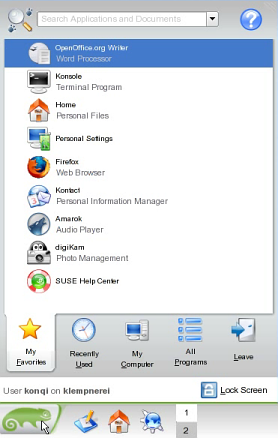
The start menu is going to be redesigned. The sneak preview released indicates that it will have inner tabs and the applications will be grouped dynamically taking into consideration the usage of the person. Update (09-Jan-2007): A number of people have written to point out that the menu for KDE 4.0 while it just might incorporate some of the features of the kickoff menu shown below, has not been finalized yet, rather work is going on and it is developed implementing the Qt 4.2 libraries. The new menu is known by the name Raptor (More details here).

Fig: Sneak preview of the start menu in KDE 4.0

KDE 4.0 will replace the present DCOP inter process communication (IPC) system with a more advanced version built from grounds up known as D-Bus. IPC is a system which lets different applications communicate with each other.

KDE 4.0 will feature an API layer called Solid which will interact with projects like the hardware abstraction layer to let hardware connect smoothly with KDE.

KDE 4.0 will feature better multimedia experience through a project called Phonon which will collaborate with Solid. So no more need to choose multimedia backends as the Phonon API will take care of it.

Plasma will provide the next generation desktop experience in KDE 4.0. It is planned to integrate three separate applications namely the Kicker (Panel), KDesktop and Super Karamba (Widgets) into a single application. And the surprise of all things is that it will be possible to run the beautiful Dashboard widgets of Mac OSX in KDE 4.0.

KDE 4.0 will sport a brand new icon set created by the Oxygen project.

The KDE developers are working to provide a better communication experience through the project named Decibel. Through this project, it will be possible to provide integrated chat and phone communication including with networks such as MSN, Jabber and Skype.

And lastly, the Akonadi project intends to design a extensible cross-desktop storage service for PIM data and media-data to communicate with KDE, Gnome, POP, and IMAP through the same storage protocol. And this will be available in KDE 4.0.

But the biggest change is going to be inside the hood so to speak. KDE 4.0 will be using Qt 4.2 library which brings with it its own extensive set of improvements. For instance, Qt 4 is designed to save lots of memory and will perform faster. Besides the speed improvement, Qt 4 has a lot of other features and some things are simplified. So programmers need less time to develop applications which run in KDE 4.0.

And since Qt 4 library has been released under GPL, one can look forward to KDE 4.0 being ported to Windows and Mac OSX. Earlier versions of Qt is available under GPL only on unix/X11 and is released under a commercial license for development in Windows and Mac OSX . So KDE 3.x and earlier which uses Qt 3.x found it difficult to be ported to these platforms.

Tuesday, 2 January 2007

Book Review: Core Python Programming - 2nd Edition

Python, the dynamic object oriented programming language created by Guido van Rossum is known to deliver both the power and general applicability of traditional compiled languages without the complexities accompanying them. Coupled with its ease of use, programs written in Python can be run on multiple Operating systems and system architectures which gives it the same portability of any interpreted language. My first brush with Python was when I tried out a beautiful game called PySol — which is more like a collection of over 200 card games and PySol is entirely coded using the Python language. Nowadays a variety of Python web frameworks have also cropped up which promise the same kind of rapid application development that is possible using other programming languages.

I found the book titled "Core Python Programming" authored by Wesley.J.Chun and published by Prentice Hall to be an ideal book to learn the wonderful Python language. This book is quite voluminous, with 23 chapters spanning 1050 pages. The book is divided into two parts the first part titled Core Python which contain 14 chapters which impart a sound understanding of the semantics of the language and the second part titled "Advanced Topics" which contain a collection of 9 chapters which give a good introduction to the specialized uses such as in database programming, network programming, using threads in python, GUI programming and so on.

In the first chapter of the book, the readers get to know the various features of Python and the steps needed to install Python on ones machine. When you install Python on your machine, it also provides its own shell where you can execute pieces of python code. The author has taken advantage of this functionality of Python in narrating the concepts throughout the book. Each concept and syntax is followed by bits of code which the readers can try out in the Python shell in its entity. I found this process much easier in learning this language as one need not go through the write -- compile -- execute cycle which is more prevalent in the traditional languages.

In depth coverage has been provided for important concepts such as lists, tuples and dictionaries as well as data-types and string sequences and they have been provided separate chapters of their own. The sixth chapter titled "Sequences: Strings, Lists and Tuples" is the second largest in the book and is quite detailed in its coverage of the topic.

Chapter 9 deals with file manipulations where the author introduces all the built in functions available in Python which allow one to open, read from and write to a file. Interestingly, the functions are also illustrated by aid of short easy to understand examples. A couple of modules related to file handling are also introduced in this chapter.

Errors and exceptions form the basis of the 10th chapter where different errors and exceptions supported in Python are explained. This chapter also explains how programmers can create custom exception classes which I found quite informative.

One of the biggest advantages of Python is that all its functionality is split up into modules. A module could be just a single python file which contain a collection of functions or classes which can be re-used in programs written in Python. And all one has to do is import the module into ones programs to start using those pieces of code. The chapter 12 titled Modules give a firm understanding of this concept and also introduces different ways in which you can import external pieces of code into the Python program.

Chapter 13 titled "Object Oriented Programming" is by far the largest chapter in this book and spans over 100 pages. In this chapter, the author endeavors to give a sound base to Object oriented concepts as well as how they relate to programming in Python. The author introduces a large number of Python classes, methods and descriptors in this chapter.

Regular expressions play a very important part in programming verily because manipulating text/data is a necessity. And it is possible to easily modify and mould data to ones choosing by way of regular expressions. Python has strong support for regular expressions. The second part titled "Advanced concepts" of the book starts with a chapter on regular expressions. In this chapter, one gets to know about the regular expression module and many functions associated with the module. The author also provides a couple of examples which give insights into the ways in which regular expressions can be used in Python to reformat data.

The next two chapters give an introduction to the world of sockets and how Python can be used to write client server programs.

Multithreaded programming forms the basis of the 18th chapter. Here the author introduces a couple of modules available in Python which make it quite easy to create threads in ones Python program.

I found the chapter titled "Web Programming" very interesting to read. Especially since Python is used in a large way to create dynamic websites. And the next chapter titled "Database programming" gives a sound introduction to the Python objects which allow one to easily connect to and retrieve data from the databases.

I found this book really informative, especially suited for upcoming Python programmers. At the end of each chapter, there is an exercise section which imparts a nice touch to this book as it allows you to test your knowledge. Even though the advanced topics (second part of the book) are not covered in depth, the author succeeds in providing enough knowledge about the relevant Python modules and functions followed by a couple of examples which whets ones appetite without overwhelming the reader. This is the second edition of the book and it has been significantly revamped to include new features introduced in Python 2.5.

Book Specifications
Name : Core Python Programming 2nd Edition
ISBN No: 0-13-226993-7
Author : Wesley J. Chun
Number of Pages : 1050
Publisher : Prentice Hall
Price : Check the latest price at Amazon.com
Rating : Excellent Book to start learning the Python language.

The author Wesley J. Chun has been a former employee at Yahoo and has played a major role in creating Yahoo Mail and Yahoo People Search using Python. He has over 20 years of experience in the IT field with over a decade of experience programming in Python.

Readers please note: I had originally contributed this review to Slashdot.org

Monday, 1 January 2007

15 tips to choose a good text type

When you use good fonts in articles either in print or in screen, it always makes a positive impression on the reader. Good fonts motivate a person to read the article from start to finish. Many times I have come across books - especially scientific journals which have a very small type face - so small that you end up squinting your eyes to read the text. In those circumstances, even if the article in question holds my interest, I usually pass it by or at the most just skim through the headings. Now a days most books that are printed have a good type face and the publishers have realized the advantages of using scientifically designed fonts to enhance the reading experience.

But selecting a good text type is not just imperative for printing, it holds equal importance in publishing articles for the web. Till a few years back, the font rendering in Linux was below par and the result was that viewing web pages was atmost lackluster. But now a days, rendering fonts in Linux has been significantly improved with support for anti-aliasing and sub pixel hinting that it has turned into a very good experience.

In a previous post titled "Optimal use of fonts in GNU/Linux", I had mentioned about all the facets related to fonts and how one can optimally use fonts in Linux. Now Juan Pablo De Gregorio blogs about the characteristics of good fonts and what fonts are good in a particular situation which makes an interesting read.