Showing posts with label solaris. Show all posts

Tuesday, 15 September 2009

Open Solaris vs Linux - A Comparison

Linux OpenSolaris
OpenSolaris and Linux to a layperson can seem similar in many ways. They both use more or less the same end user applications, have similar desktops, and are open source. But scratch the surface and you find that they are entirely different products all together.
Some of the notable differences which an end user may encounter are as follows :
Read more »

Monday, 14 September 2009

Comics - Learn how ZFS safeguards your data

I am sure you have heard euologies about ZFS - the default file system on Solaris. But do you really know why ZFS is considered to be a superior file system ? If you are in doubt, never fear, Nexenta Man has come to your rescue.

Read the exploits of Nexentaman to learn how ZFS keeps your data safe.

Wednesday, 29 August 2007

Installing Solaris 10 on an under $300 machine

Solaris is perceived to be a heavy weight operating system in terms of the kind of resources (read hardware) that is required to install and use it. And when you hear the word Solaris, you at once visualize Sun Blades and Sun fire servers costing upwards of a few thousand dollars.

But it is possible to install Solaris 10 on a machine which costs under $300 if the machine is build with carefully chosen parts as shown by Christian Joaquin Cruz.

He selected parts with the following specifications to build his test machine :
  • Motherboard - Intel D201GLY "Little Valley" Mini-ITX
  • Hard drive - Maxtor 300GB PATA 16mb-buffer drive
  • Memory - DDR 1GB pc6400 single-module 800MHz
  • Optical drive - Sony DRU-170C
  • Case - CoolerMaster Elite 340 mATX Case
  • Power supply - RaidMaster 380w Power Supply
  • Case fan - LD 80mm
And it cost him $279 before taxes. After installing Solaris 10 on this machine, he concludes ...
The machine, after installation of all the drivers, networking and apache configuration, was very functional and able to serve up web pages on my local network quite well. Secure Shell connections worked straight out-of-the-box, as did hot-plug-in detection of USB thumbdrives. The CD/DVD reader/burner was compatible with Solaris, but Sun has omitted the inclusion of a graphical CD/DVD burner application. The upshot of this is that you have to use the commands mkisofs and cdrw to use this functionality (or download a compatible GUI based application).

In most respects I am quite pleased at the results. It's quite a cool box for the very low amount of time and money invested.
Read the full findings of Christian Joaquin Cruz in taking his newly built under $300 Solaris box on a test drive. [Print version]

Thursday, 14 June 2007

Linus Torvalds vs Jonathan Schwartz - clash of two titans ?

The fire started when Linus Torvalds wrote a reply to a mail in the Linux kernel mailing list where he pondered on Sun Microsystem's true intentions in willing to release Solaris under a GPLv3 licence and how the rise of Linux has hurt Solaris and how Sun doesn't want to help Linux.

In his own words, this is what Linus said (and I quote parts of the mail):

They may like open source, but Linux _has_ hurt them in the marketplace. A lot.

They want to use Linux resources (_especially_ drivers), but they do *not* want to give anything back (especially ZFS, which seems to be one of their very very few bright spots).

So to Sun, a GPLv3-only release would actually let them look good, and still keep Linux from taking their interesting parts, and would allow them to take at least parts of Linux without giving anything back (ahh, the joys of license fragmentation).

Jonathan Schwartz the president and CEO of Sun Microsystems has written a reply on his blog to Linus Torvalds explaining Sun's true intentions and why it is taking so long for Sun to release Solaris under GPLv3.

But most of all, from where I sit, we should put the swords down - you're not the enemy for us, we're not the enemy for you. Most of the world doesn't have access to the internet - that's the enemy to slay, the divide that separates us. By joining our communities, we can bring transparency and opportunity to the whole planet. Are we after your drivers? No more than you're after ZFS or Crossbow or dtrace - it's not predation, it's prudence. Let's stop wasting time recreating wheels we both need to roll forward.
You may also be interested in reading the comment made on Jonathan Schwartz's blog by OpenBSD founder Theo de Raadt.

Sunday, 29 April 2007

Review of Sun Solaris 10

For some time now, I have been tinkering with Solaris 10; the robust Unix from Sun Microsystems. In the past, I have posted news of the free Solaris media kit and its pictures as well as published news of Open Solaris starter kit give away.

With Sun releasing Solaris source code under the CDDL license and naming it Open Solaris, a number of clones of Solaris have cropped up in the past two years or so, such as Nexenta, Belenix and SchilliX. But Sun also provides Solaris in the form of Solaris Express incorporating the latest advances. And Solaris Express acts as a sand box with many new features eventually make their way into Solaris OS after a period of incubation.

Even though Solaris was originally designed for SPARC (Scalable Processor Architecture) hardware, it also supports Intel platforms. This has thrown open the doors for the hordes of Solaris enthusiasts who couldn't afford a SPARC based computer, to install Solaris on their PC and take it for a run.

Once you get hold of the CD/DVD containing Solaris 10, the next step is to install it. Installing Solaris from CD/DVD is a very simple and straight forward process. As long as you have a minimum of 256 MB RAM, you can go ahead with installing it. But any less memory means you will have to upgrade your PC memory before you can start installing Solaris.

I did not encounter any problems at the time of installation. And in no time, I was able to install Solaris and boot into it. Solaris 10 bundles with it mainly two desktops - them being Common Desktop Environment (CDE) and the Java Desktop System which is actually the Gnome desktop built on top of the Java framework.
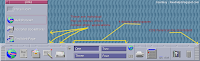
Solaris CDE PanelFig: CDE Panel - can be iconized

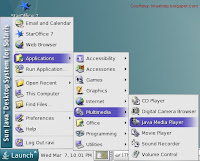
Solaris 10 ScreenshotFig: Java Desktop System Menu

Those who are coming from a KDE/Gnome/Windows background might initially be put off by the CDE. But after working in it for some time, I found the CDE to be a very functional desktop. To put it succinctly, it has some elements of the AfterStep window manager in GNU/Linux with lots of additional useful features.

In CDE, each component including the Panel can be minimized to the Desktop and all minimized applications are neatly arranged as icons on the Desktop. CDE also saves the state of a running application when you log out. And when you log back in, the application is automatically opened and displayed in its previous position.

Sun provides each Solaris user a choice of subscribing to the Sun Connection. It is a paid subscription and once you join it, you can use the Sun update manager to provide you suggestions, automatically manage updates, prioritize and keep a history of updates. OR you can also choose to apply the updates manually without any assistance. You can also download the latest patches and driver updates at sunsolve.sun.com.

Solaris Management Console 2.11
Considering that Java language is being developed by Sun, it is no surprise that it plays a very important role in Solaris. For instance, to do system administration tasks, Solaris has an all-in-one GUI toolkit in Solaris Management Console which has been developed using Java.

While it is also possible to use commands to achieve system and network administration tasks, SMC happens to be the preferred way. Here you can know about the status of your system such as your system information, processes running, logs, performance and so on. More over, it contains options to do almost all system administration tasks such as managing users, system configuration, managing services, storage, devices and hardware.

Solaris Management Console uses the concept of a toolbox to provide a view of various system administration tools or applications within a common user interface. It has three components namely :
  1. SMC client called the console
  2. SMC server
  3. SMC console toolbox editor
To start the SMC toolbox editor or the SMC client, you run the following command :
$ /usr/sadm/bin/smc
As you can see, you need not be logged in as root to open the SMC. But to view all tools, it asks for authorization.

Similarly to check the status of the SMC server, you run the following command as root :
# /etc/init.d/init.wbem status
Suppose I want to mount a disk partition in Solaris. It is a piece of cake and is as simple as opening up SMC, then navigating to Storage -> Mounts and shares -> Mounts. Here select from the menu, Actions -> Add NFS mount. And follow the instructions. Similarly there are tools to create and manage RAID volumes.
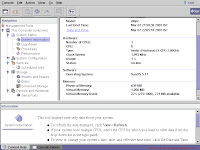
Solaris 10 System Management consoleFig: System Management Console

While the number of software bundled with Solaris 10 is no where near that offered by GNU/Linux such as Debian, it does come with a useful set of programs such as the text editor, music player, web browser and so on which makes it a practical solution as a Desktop OS.

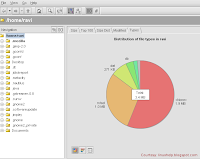
To spell out some of the unique software Sun bundles with Solaris 10, you get the advanced StarOffice productivity suite which is build upon Open Office.org, a card game called JSpider developed using Java, a Java based media player, a disk analyser 'JDiskReport' which is a free graphical disk report utility; also developed using Java. JDiskReport enables you to visually understand how much space the directories and files consume on your disk drives.
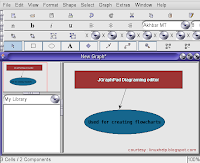

JGraphPad diagraming softwareFig: A diagramming software

Disk Analyzer in SolarisFig: Get a graphical view of the disk space occupied by your files.

Solaris also has support for popular browser plugins for Java, Adobe Acrobat Reader, Realplayer and Flash player (ver 7.0). You can download the plugins here.

Apart from the software bundled with the official Solaris CDs/DVD, Sun also makes available a collection of GPLed software compiled to be run in Solaris, which you can download from the Sun Freeware webpage.

One thing which I found really strange was the fact that Solaris comes with Mozilla ver 1.7 web browser and not Firefox. So if you are too attached to using Firefox, you are out of luck, unless you succeed in compiling Firefox from source.

Another aspect of Solaris that is really endearing is the excellent set of online documentation which has been made available by Sun. In fact I do not know of any Linux distribution which has even half the quantity of documentation as that made available by Sun Microsystems for Solaris. The Solaris documentation is available at docs.sun.com where each and every technical aspect of Solaris is covered. You can also download whole sets of documentation and guides in PDF format for offline use too. This could be a reason why there are not that many Solaris textbooks in print as you find on GNU/Linux.

Even though Solaris has not attracted the same level of evangelism as Linux has succeeded to attract, it does not have any dearth of followers. There are a large number of websites which cater to providing Solaris specific packages of a variety of software not officially made available by Sun Microsystems. The notable among them being the following :

Blastwave.org - This is a website which provides a slew of GPLed packages for Solaris. The USP of this website is that it provides an easy way of installing its packages on Solaris - some what similar to the apt-get method used in Debian Linux. The script pkg-get that they provide automatically does dependency checking and installs the latest packages that you require. I was really surprised to find GNUCash ver 2.0 among the packages that they offer - some thing which I haven't yet been able to get for Slackware.

SunFreeware.com - This is another humongous (Should I say the largest?) unofficial repository available for Solaris specific packages. And this site is very popular among the Solaris users and administrators alike.

While reviewing Belenix, I had noted the advantages Solaris has over GNU/Linux. Apart from what I had listed, Solaris also has a new advantage which is the "Secure by default" tag that Sun has provided it. The latest version of Solaris comes with all the ports closed by default.

I believe this is an operating system which holds a lot of promise as a Desktop OS. And if the people steering Sun Microsystems take the right decisions (hint: GPL ???), it just might take the fancy of a large section of IT savvy public, enough to motivate many of them to start developing Free software for Solaris.

Friday, 2 March 2007

Free Open Solaris starter kit

Two months back, I had gustily bought the news of the free Sun Solaris media kit which consisted of a set of 3 DVDs which contained the Solaris OS for the Sparc and Intel architectures as well as Java software goodies. And as a follow up, I had posted a couple of photos of the media kit I received as well. Now it is OpenSolaris which is handing out free DVDs. But the OpenSolaris give away is more exciting for a number of reasons.

The OpenSolaris media kit, which they chose to call the starter kit consists of a set of two DVDs and a mini book. You heard right, they have also included a booklet which contain a collection of tutorials and documentation which will be of use to OpenSolaris neophytes. The DVDs will contain apart from the Solaris Express, the community built images of three distributions of OpenSolaris namely Nexenta OS, Belenix and SchilliX as well as OpenSolaris source code. You will also find the Sun Studio compilers included in the offering. You can order your copy of the starter kit here. I may also add that you need to register first to place the order.

In all respects these are very good times for Solaris users as Sun Microsystems is going on a limb to sustain the excitement towards its software products by developers and users alike and ensure that its legacy does not wither away. A good move in these fast changing times. Now I am waiting for the day when they will release Solaris under the GPL v3 license.

Thursday, 18 January 2007

OpenSolaris installation screencasts

Today, I came across a very good collection of screencasts which visually walks one through the backing up, repartitioning and then installation of Open Solaris on ones laptop. The OpenSolaris release is 5.11 and all the installation steps are shown. You need Flash player ver 6 or greater to watch the screencast - not a big issue as Adobe has released Flash player ver 9 for Linux. In a nutshell, these are the steps that are showcased in the screencast.
  1. Backup your laptop to prevent any data loss, should something go wrong. The laptop has Windows XP professional pre-installed. So first the disk is defragmented and scan disk utility is run to make sure there are no errors. To do the actual backup, they use the free G4U - short for Ghost for Unix, which is similar to the Norton Ghost disk cloning software in Windows. This can be downloaded into three floppys or as an ISO and burned onto a CD. Using G4U, they perform a backup of the whole disk to a remote ftp server. G4U can also be used to do a disk to disk backup.
  2. The second step in the procedure is to repartition the disk to make room for OpenSolaris. For this they demonstrate how to shrink the Windows partition using the Free software QtParted. This is a GUI front end for the 'parted' tool and is similar to Partition Magic in that it non-destructively shrinks the partition. This software is available on the System Rescue CD which is a remastered Gentoo Linux distribution. One thing worth noting is that while creating the new partition, they format the new partition as Linux swap.
  3. Install Solaris on the newly created partition. This screencast shows all the steps in the installation of OpenSolaris albeit in a time compressed sequence.
  4. And finally, another screencast shows how to download and install Sun Studio 11 software on OpenSolaris.
All in all, there are 5 screencasts which I found to be truly informative. If you have the time and the bandwidth, watching the screencasts is highly recommended. More over, they may not be around for a long time as the domain doesn't work properly except the link containing the screencasts.

Thursday, 11 January 2007

A perfect New Year Gift from Sun Microsystems - A Free Solaris Media Kit

A few weeks back, I had shared with you the news of Sun Microsystems distributing free Media Kit consisting of the latest build of Solaris 10 operating system. I had placed an order for a media kit at their website and guess what, a couple of days back, I received my copy of Sun's free media kit.

The media kit is a fabulous DVD case consisting of three DVDs - a copy of Solaris 10 6/06 build operating system for the x64/x86 platform, a copy of Solaris 10 6/06 build operating system for the SPARC platform and finally a DVD containing Java software goodies which include Sun Studio 11, Sun Java Studio Enterprise 8 and Netbeans ver 5.0.

Fig: Sun Media Kit DVD case

Fig: DVD case opened

Fig: The Media Kit contains 3 DVDs

I was successful in installing Solaris 10 on my machine from the DVD and the installation went without a hitch. Solaris 10 comes with a graphical GUI installer as well as a text based installer. Sun specifies the minimum recommended memory requirement for running Solaris 10 to be 512 MB. I was able to successfully install the OS on a machine with 256 MB memory. In fact, if your machine has just 256 MB RAM, Solaris automatically selects the text based installer. For machines with at least 512 MB RAM, it uses the graphical installer. And if your machine has less than 256 MB RAM, it refuses to install on your machine. Solaris 10 bundles with it two desktops - Common Desktop Environment (CDE) and the more popular Java Desktop which is really the Gnome Desktop running on top of a Java framework. Solaris 10 also comes with two X servers, them being the Xsun Server and the more common Xorg server and you can choose one over the other at the time of installation.

You can look forward to a review of Solaris 10 on this site in the near future. But for now, you may whet your appetite by viewing a couple of photos I took of the Sun Media Kit ;-). And those who haven't yet placed an order for the Free Media kit can do so at Sun's website - but before that, just make sure that your machine has the required memory to run this robust operating system.

Sunday, 10 December 2006

Sun Microsystems - doing all it can to propagate its immense software wealth

A couple of weeks back, Sun Microsystems created a buzz in the tech world when it announced its decision to release their flag ship language Java under a GPL license albeit GPL v2. But even though it could have surprised and gladdened the Free Software fans the world over, it is clear that it was a well calculated, deeply thought out decision which was aimed at the survival and further propagation of the Java language.

It is true that at its core, Sun is a hardware company with the bulk of its revenue being generated from selling high end servers, workstations and storage solutions. But it has also invested heavily in developing robust software. And what is amusing is that it does not charge anything for most of the software it has developed and has been providing it free of cost. OpenOffice.org, Netbeans, Java and Solaris being a case to the point.

At one time, Solaris was the most popular Unix operating system enjoying a huge market share, greater than even IBM AIX and HP-UX combined. Then Linux arrived at the horizon and slowly started chipping away at the market share of all the Unixes including Solaris. With Linux gaining demi god status, it was inevitable that Sun take a deep look at itself. It realized that if it did not re-structure its thinking, it will be reduced to a mere hardware company like Dell selling boxes, from its present status as an IP creator. And it has shown enough foresight to change with changing times. Instead of fighting Linux, it started bundling Linux - more specifically Red Hat Linux with its servers along side its own operating system Solaris. And over an year back, it released the Solaris code under an open license and named it OpenSolaris.

Now Sun is going even further by hinting that it is seriously considering releasing Solaris under a GPL license. A few years back, the PCs that were sold did not meet the minimum requirements for running Solaris which made it a difficult proposition to run it as a desktop. But with rapid advances made in the hardware field, a drastic drop in hardware prices and partly thanks to Microsoft for upping the ante with regard to minimum memory requirements for running Vista, it has suddenly become possible to look at Solaris as a viable desktop OS alternative as it works smoothly with just 512 MB RAM.

Fig: Get a Free DVD consisting of Solaris 10 and Sun Studio software

Taking all these events into consideration, Sun is doing everything in its power to ensure that the fruits of its hard work lives on and gains in popularity. A few days back when I visited Sun's website, I was surprised to see a link offering to send a free DVD media kit consisting of the latest build of Solaris 10 and Sun Studio 11 software to the address of ones choice. I have always believed that one of the reasons for Ubuntu to gain so much popularity was because of its decision to ship free CDs of its OS. Perhaps taking a leaf from Ubuntu, Sun has also started shipping free DVDs of Solaris 10 OS to anybody who want a copy of the same - a sure way of expanding its community.

In the long run, the logical thing for Sun to do will be to release Solaris under GPL. By doing so, Sun would gain the immense good will of the Free Software fans the world over and ensure a permanent place in the history of computing. Unlike GNU/Linux which is a loose amalgamation of scores of individual software pieces around the Linux kernel, Solaris is a whole product whose tools are tightly integrated with its kernel. So even if Solaris is released under GPL, it may not see as many distributions as we see in Linux. And who is better qualified to provide services and support for Solaris other than Sun itself?

Monday, 31 July 2006

Book Review: Unix to Linux Porting - A Comprehensive Reference

In this age of numerous flavours of Unix and Linux OSes, it is imperative that applications are developed to work on a vast majority of them. But historically, Unix had been fractured, with each flavour of Unix - be it IBM AIX, Sun Solaris or HP-UX implementing its own libraries and system calls. And it would have been a nightmare to port an application running on one Unix flavor to another. But things started to brighten up a little when most of these Unices as well as Linux decided to embrace the standards set forth by the standards bodies such as ISO and POSIX.

May that be, it is still a bit difficult to port Unix applications to Linux and vice versa because the applications that are to be ported might be using non-standard APIs. And the team porting applications from one Unix flavour to Linux or vice versa should be aware of the system calls and other features of both Unix and Linux. For instance, the system calls made by each of these OSes - IBM AIX, Solaris, HP-UX or Linux - even though have a lot of similarities do have their own differences. And some system calls in one OS may not have an equivalent one in the other.

The book titled Unix to Linux Porting - A comprehensive reference, co-authored by Alfredo Mednoza, Chakarat Skawratananond and Artis Walker and published by Prentice Hall is a book which aims to be a capacious guide for developers who are into porting Unix applications to Linux.

Ironically, there are only 7 chapters but these chapters and the succeeding appendices make up over 700 pages which make this book rather voluminous.

The task of porting applications from one OS to another can be split up into 4 broad phases which are Scoping, Analysis, the actual Porting and finally the Testing and debugging phase. This book covers each of the 4 steps in a detailed manner dedicating separate chapters for each of them.

In fact the porting phase is further split up into 3 chapters for each of the three Unices - Solaris, IBM AIX and HP-UX. And in each case the respective authors have started from the rudimentary steps like setting up the porting system, explaining the differences in language specification, the compiler flags as well as the various tools like the linker, debugger and make in the respective OSes.

This book contains tables of all/most of the system calls in the respective Unix operating system and their equivalents in GNU/Linux and a short explanation of what the particular system call does.

The final chapter titled "Testing and Debugging" explains the use of tools such as GNU debugger, the use of strace and ltrace to pin point problems in the programs ported to Linux, memory optimizing tools such as electric fence, mpatrol and valgrind among others in detail.

But I found that the appendices - and these are as big and as many as the chapters themselves - have a lot of additional information which includes Solaris, IBM AIX and HP-UX to Linux reference tables, the porting issues faced when porting Unix applications to Linux to be run in Mainframes and so on. I really liked the appendix titled "Solaris to Linux Migration : A Guide for System Administrators" which lists the commands used in Solaris and their equivalents in Linux.

This book is definitely one of a kind and is an invaluable reference for anybody who is interested in porting Unix applications - and there are a whole lot of them - to work naively in Linux. But even those who are not into porting would benefit from this book as it provides insights into the system calls made by the OSes and the similarities and differences in their implementation.

Considering the complexity of the subject, it is not surprising that it took three people who are experts in their respective fields to come together to write this book. Alfredo Mendosa is an IT specialist in the Solution Enablement Group within the IBM Systems and Technology Division and is an expert on thread management and software algorithms. Chakarat Skawratananond holds a PhD and is a technical consultant in the IBM eServer Solutions Enablement Organization providing technical assistance to software vendors porting applications to IBM POWER systems running AIX and Linux. And Artis Walker is a consultant in the IBM Solutions Development Group and has published numerous tutorials and articles on migration and performance tuning for AIX and DB2. He is also the main author of several articles highlighting open-source solutions for AIX and Linux on the IBM POWER platform.

Chapters at a glance
  1. Porting Project Considerations
  2. Scoping
  3. Analysis
  4. Porting Solaris Applications
  5. Porting AIX Applications
  6. Porting HP-UX Applications
  7. Testing and Debugging
  8. Appendix A : Solaris to Linux Reference Tables
  9. Appendix B : AIX to Linux Reference Tables
  10. Appendix C : HP-UX to Linux Reference Tables
  11. Appendix D : Linux on POWER
  12. Appendix E : gprof helper
  13. Appendix F : Porting issues specific to IBM zSeries Mainframes
  14. Appendix G : Solaris to Linux Migration: A Guide for System Administrators
Book Specifications
Name : Unix to Linux Porting - A Comprehensive Reference
ISBN No : 0-13-187109-9
Authors : Alfredo Mendoza, Chakarat Skawratananond, Atris Walker
Publisher : Prentice Hall
No of Pages : 700
Price : Check at Amazon.com
Rating : Very good

Saturday, 4 March 2006

A comparison of Solaris, Linux and FreeBSD Kernels

As a Linux user, I am sure you have come across the saying - Linux is just the kernel - and that all the tools (command line or otherwise) that come with it are bundled with it to make it the user friendly OS that it is . But what about other POSIX OSes like FreeBSD and Solaris ? Well, they are said to have the kernel and the command line tools more integrated with each other. But the difference doesn't end there. There are big differences in their respective kernels and how they accomplish a task.

Max Bruning
has written a very good article which throws light on the differences (or rather the comparisons) of the kernels of these three OSes. He examines the three subsystems namely sheduling, memory management and file system architecture.

He arrives at the conclusion that kernel visibility and debugging tools play an important role in understanding the system better. Tools which help one to understand the kernel code are even more invaluable than just having access to the source code alone. On this note, he feels Solaris has a distinct advantage over Linux and FreeBSD because it comes with tools like kmdb, mdb and DTrace which help a developer to analyze the code better.

Wednesday, 21 December 2005

Belenix - A Live CD based on Open Solaris

I had always wanted to try out Solaris OS ever since Sun released its code under an open licence and renamed it as Open Solaris. But even though open solaris had its own website, downloading a binary image was an entirely different matter and was not an easy proposition. So when a few brilliant Indians :) at the Bangalore India Engineering Center of Sun Microsystems released a live CD called Belenix based on Open Solaris, I decided to give it a spin.

The first thing that you encounter when you boot using the Belenix live CD is the Grub boot loader. Here you are presented with 3 choices, them being :
  • Belenix (32 bit)
  • Belenix (32 bit) with no ACPI and
  • Boot from harddisk - which will boot your normal OS from harddisk.
I selected the default selection (Belenix 32 bit) and it started booting the OS. At this point, a lot of messages scrolled off the screen and eventually, I was presented with the 'Keyboard layout selection' where I chose the US keyboard layout. Belenix gives the user two choices while booting. You can either boot into a full fledged GUI environment (which by the way is XFce desktop) or choose to go for command line login. Once I made the necessary choices, it started the process of configuring the devices and mounted the local partitions.

Exactly after 6 min, I got a fully loaded Xfce environment. Belenix being a Live CD intended to showcase the power of Open Solaris, does not come with as many GUI utilities as a Linux Live CD like Knoppix. This could be because the real power of Open Solaris and its difference with Linux lies under the hood.

While in the GUI environment, it would be a good idea to look into the services running on it. For that right click on the desktop and select services. Belenix has around 66 system services running in the background. Another thing to try out is the DTrace toolkit.

DTrace toolkit is a collection of tools written using DTrace for the Solaris 10[tm] by Sun Microsystem. It can be used by system administrators and developers to tune the performance of as well as pin point errors in the processes running in Solaris OS.

Applications bundled with Belenix
  • Xfce desktop
  • DTrace Toolkit Guide
  • Bash Shell
  • GVim - a versatile text editor
  • Mozilla Firefox - web browser
  • Thunderbird - EMail client
  • A game called Super Tux
  • Network profiles.
Advantages of Belenix
  • Belenix is not targeted for normal use but it endeavours to showcase Open Solaris by letting people try it without installing on the harddisk.
  • More over, downloading and installing Open Solaris would be a harrowing experience as Sun has not made the job any easier.

Cons of Belenix in its current form
  • Does not come with man pages. So prepare yourself with a good book on Solaris if you want to dig deep into learning Solaris.
  • No easy way of installing on the hard disk though there is a basic installer provided which helps in creating Solaris partitions on the hard disk .
Strong points of Open Solaris over Linux
  • Comes with DTrace, a toolkit which can be used to tune the performance of processes running on Solaris. Linux achieves this using a combination of tools like strace and oprofile but it cannot be compared to the power and versatility of DTrace.
  • Another area where Open Solaris outshines Linux is in the power and sophistication of its security features. These being :
    1. Role Based Access Control - Administrators use role-based access control to delegate limited authority to subsets of users. This is similar to SUDO in Linux but much more flexible. In Solaris RBAC is fully integrated, and administrators use standard utilities such as useradd to administer user roles.
    2. Process Rights Management - With process rights management, administrators grant individual processes only the privileges they need to perform the work assigned to them. An equivalent of this feature is not yet available in Linux.
    3. System partitioning using containers - Solaris implements system partitioning using Containers. Containers are virtualized environments running in a single instance of Solaris. Processes running in a container can access only the resources allocated to that container. Of course Linux can also implement this using third party products like Vmware or Usermode Linux or provide file system isolation using chroot jails. But this technology is well integrated in Solaris.
  • And finally, Sun gives you the guarantee that applications compiled for one version of Solaris will continue to work on other versions.