Tuesday, 8 November 2005

Adding a swap file to your Linux system

There are times when you are running a resource hungry application and your system slows to a crawl. At such times, a quick look at the memory usage of your system tells you that your system has used up all the memory including swap memory. This is a situation where you can create a temporary swap file to aid the system. These are the steps to be followed to create and mount a swap file in Linux.
Lets say, you want to add 64MB swap file (named my_swap_file) temporarily.
  1. First create a file of size 64 MB.
    # dd  if=/dev/zero  of=/my_swap_file  bs=1024  
    count
    =65536
    Here bs is block size in bytes and count is the number of blocks to be used. So the total size of the file will be 1024*65536 = 64 MB
  2. Make the permissions read and write for owner and no permissions for group and others.
    # chmod 600 /my_swap_file
  3. Prepare the file to be used for swapping.
    # mkswap my_swap_file
  4. Start using the swap file
    # swapon my_swap_file
If you want this file to be used for swapping across reboots (permanently), then enter the following line in the /etc/fstab file.
/my_swap_file   swap   swap   defaults   0   0

Monday, 7 November 2005

A Preview of the $100 Laptop running Linux

A few months back, I had written about the $100 laptop that is being brought about by MIT Media Labs. It seems the work is going on in right earnest. And recently a demo of the first prototype of the product was conducted for a select few. Ethan Zuckerman, who was one of the attendees writes:

The mockup I saw was about the size of a large paperback book. There's a stiff rubber gasket around the edge of the machine, which can double as a stand. The keyboard on the mockup was detachable, but will probably fold out on a hinge. The system is designed to work in three modes: laptop mode (screen up, keyboard down, handle behind as a stand); book mode (screen on the front, keyboard on the back, comfortable indentation for holding it in the left hand. Pressing on the keyboard "accordian-stype" - as Negroponte puts it - allows for page scrolling); and game mode (screen in the front, keyboard in the back, held sideways, like an oversized PSP. Two trackballs, surrounded by four way buttons, on each side of the screen act as controls, and function keys on the back act as additional buttons.)


and still further he writes ...


The laptop is not "for sale" - it's going to be available for students only, and will be distributed through the same channels that school books and uniforms are.
...
The idea is to make the laptop required equipment for all school students and price it on a basis where it replaces textbooks. In some of the developing world school systems Negroponte has investigated, textbooks cost $20 per student per year - if the laptop is sold to students (or provided by the national government) with a five-year financing option, it costs the same amount as annual textbook spending. Except that, if schools need to license intellectual property from existing publishers, the cost would certainly increase.


Read the Full Story

Sunday, 6 November 2005

script - A command to record everything that scrolls off your terminal

Suppose you are compiling a program and all the error messages, scroll off your screen without giving you time to read.

In Linux, you can use script command to log all the messages that scrolls off your terminal.
Read more »

Saturday, 5 November 2005

5 Point program to beat the Mac

I have been thinking lately, why Apple is so successful in selling its products ? It is so successful that Apple's stock has risen from $14 a few years ago to $59 at present.Is it because it has a superior OS ? No. Its OSX is only as stable and secure as the Unix base on which it is built. Apple is successful in selling their products because they bring out aesthetic looking beautifully designed products. The keyword here is beauty. It helps that the underlying OS is stable too.

Humans have always been attracted by beauty - either in others or in the things around them. I shudder to think of what would have happened if God had created a plain looking Eve instead of the beauty she was. Adam would not have taken any interest in her and that would have been the end of the human race. Heck! God would have had to start all over again (just kidding).

But seriously, if you keep a PC and a Mac side by side and ask a kid to choose one from the other, I will bet my shirt that the kid will choose the Mac over the PC. Is it because he realizes that OSX is better? No. He takes his decision based on the beauty of the products.

Why do you think there is such interest generated on the iPod ? Is it because the music you get on an iPod is cheaper ? Or is it because there are no such devices brought out by other firms ? No. People go crazy for the iPod because it is a well designed beautifully crafted piece which has flaunting potential. You just flash an iPod around a group of strangers and you are guaranteed to start a conversation.

I wouldn't keep the PC in its current form in my drawing room along with my TV. I would rather that it be kept in my bedroom away from the prying eyes. But a Mac can easily find its place in my drawing room. When it is not being used as a computer, it acts as a piece of art.

So I have put together this 5 point agenda for PC manufacturers which is a sure shot Mac killer.
  1. Hire a good Design consultant : I am saying this to all the Dells and HPs of this world. Be serious about this guys, if the PC has to compete with the Mac, it should have appeal. With the money you make, you can easily afford the services of a design expert. Design a PC which is as beautiful if not more than a Mac.
  2. Reduce the form factor of the PC - The PC in its current form is a 10 KG gorilla which requires a hefty adult to move it around. By reducing the form factor, the PC can shed its excess weight and will take up less space which will be appealing to the customers.
  3. Use hardware parts which has drivers readily available - Make sure the hardware you use in the PC you build have driver support available for all OSes including Linux (Why Linux? read on... you will know soon).
  4. Use cutting edge technology - The PC should have enough interfaces like USB,Firewire, Gigabit Ethernet ports built-in to it and should be WiFi enabled. If someone can bring out a $100 laptop, with these technologies built in, I wonder what is stopping you.
  5. Preload Linux on all your PCs. You can save a lot of money in OS licenses and can even market the PC at a lower cost than the competition out there by deciding to use Linux. If you ask me, I can do everything and more in Linux that I can do on a Mac. Linux has come of age.
Think about it, just two countries, India and China combined, has a population of over 2 billion. Out of this only a tiny fraction of its people own a computer. Which means there is a huge market potential for selling computers in these countries. Just by bringing out a computer of the above specs and preloaded with Linux and priced economically, you can conquer this still untapped market of epic proportions.

If the five points stated above were followed by any hardware manufacturer, I see no chance of the Mac making a killing in the computer market..., unless Apple decides to give out OSX for free with the hardware it sells. Remember, they are moving on to the Intel platform in 2006.
Clarification: After I wrote this post, I have been getting quite a few mails I think are from apple fan boys ;-). So I would like to make my stand clear.
  1. I am no Mac hater. In fact if you read what I wrote just before the 5 points, you will see that I have indeed praised Apple in my own way for bringing such beautiful products.
  2. The 5 points were targeted at PC manufacturers and not at customers. There is a void felt in the PC arena because the customer is faced with buying PCs which do not look good when compared to a Mac. But once Apple makes the move to Intel platform in 2006, this void will be filled and by that time if the PC manufacturers are found sleeping, then the customer will make the intelligent choice of embracing a Mac.
  3. And lastly, my comment on installing Linux on the PC was because not all people will be able to afford a Mac. At least not in the current price range. And I think embracing Linux will help the manufacturers to price their product in a affordable range.

Friday, 4 November 2005

Differences between various Unix flavors

If you look at the history of Unix, you will find that it is strewn with different flavors of Unices, each doing a particular task in its own way, there being no synergy between them. Inspite of all this, some of the Unix flavors have succeeded in surviving the Linux onslaught.
As a Linux user, have you ever wondered what differences each Unix flavour have from each other ? Yes? Then look no further. Bhami.com has compiled an extensive table detailing the differences in commands used for executing a task in various flavors of Unices and Linux which I found really interesting. It is a real eye opener for anyone interested in computing on the Posix platform.

Wednesday, 2 November 2005

Gimp - The graphics suite par excellence on Linux

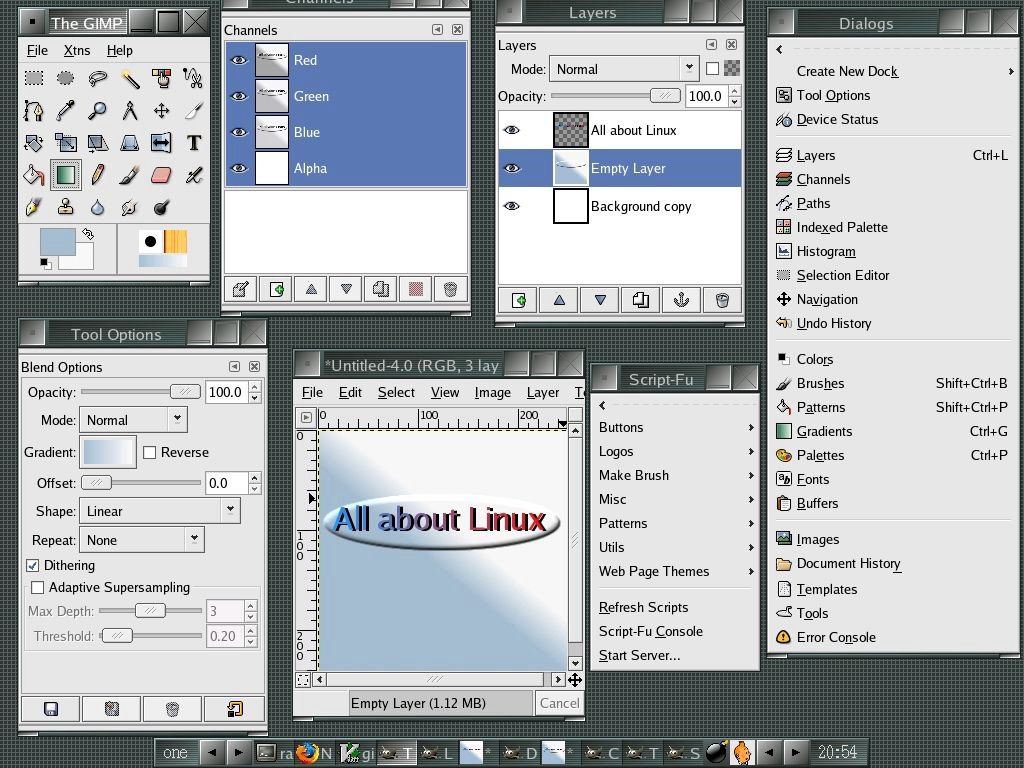
Gimp is a GPLed cross platform graphics suite which rivals many commercial graphics packages available in the market. I have been using Gimp for all my graphics needs for the past two years. And believe me, this is a winner not only in terms of price (which it is) but also in quality and features. You can do everything and almost anything using Gimp that you can achieve in Adobe's Photoshop. All the screenshots and images used on this site have been created or modified using Gimp.

Fig: Main interface of Gimp

Gimp is an ideal tool for optimizing the images meant to be hosted on the web. The most endearing aspect of Gimp for me is the plethora of scripts and plugins that are installed with it. Gimp uses a scripting language called Script-fu which can be used to create beautiful banners and buttons meant for use on websites.
You should not mistake a script with a plugin. A plugin requires a image to work on, where as a script will create an image from scratch. There are over a hundred plugins and script-fu's available for gimp. Want to create a ripple effect on your image? No problem! you can create it with the click of a button. The area where Gimp outshines Photoshop is in creating images optimized for the web.
As a first time user, you will find the user interface of Gimp a bit clumsy because each function has its own window unlike Photoshop which has a single main window which encloses all the features. But after working in gimp for some time, you will realize that it is really a great advantage to have multiple independent windows. Let me elaborate on what I just said. Usually, you will be doing graphics manipulation using a monitor having atleast 1024x768 or higher resolution. In this resolution, you can neatly arrange the multiple windows in gimp in such a way that they don't overlap each other (See Fig below). This makes working in gimp easier and enjoyable. Gimp is available for multiple platforms (Windows, Linux, Unices ).

Fig: Gimp windows arranged for efficient use.

Fig: You get a good set of brushes in Gimp

Some of the powerful features in Gimp are as follows:
  1. Support for creation of Layers, Channels and Paths.
  2. Excellent collection of plugins and scripts (Script-Fu)
  3. Creating Alfa channels and Layer Masks.
  4. Good set of tools equivalent to those found in Photoshop like crop tool, gradient tool, Magic wand, Clone tool, paint brush and so on which will make a Photoshop user feel right at home.
  5. Save images in over 34 formats including in Photoshop file formats, not to mention TIFF, GIF, JPEG, PNG and Postscript.
  6. Gimp maintains a history of your actions which helps you to go back to any previous point if you have made a mistake.
  7. Can easily automate a function by writing your own scripts to do a particular task using script-fu.
Shortcomings of Gimp
  • One of the biggest short comings of Gimp is lack of good CMYK support.
    For those in the dark, CMYK (Cyan, Magenta, Yellow and Black) refers to the color of inks used in the printing process. So if you are readying a graphics (maybe a brochure) to be send to your neighborhood commercial printers, then you have to convert it to CMYK mode before sending it to them. CMYK support is very important for any graphics package to make it big in this profession. And Photoshop is where it is because it has better CMYK support. But that is bound to change as Gimp developers have promised better CMYK support in the next major release of Gimp.

Fig: Gimp has an Inbuilt Unit Editor

Fig: A well designed 'preferences' dialog

Fig: Create special effects on images with ease

Bottom Line
  • Home users need not look at any other software when Gimp is around. You get all the power that you need - be it photo retouching, red-eye removal, creating borders for your photos and more - in Gimp.
  • If you are a web developer creating images to be used on a website or to be viewed on a PC, you will be working in RGB (Red,Green,Blue) mode. I strongly recommend using Gimp as your graphics software.
  • But if you create graphics meant for printing, then it is better you stick to Photoshop for the time being because of poor support for CMYK mode in Gimp.

Monday, 31 October 2005

mount your files the Linux way

In Linux, if you want to access a filesystem be it a CDROM, a partition or a different drive including zip, floppy, usb keys and so on, you have to mount the filesystem first prior to start using it. In most cases, the system will do it for you. But sometimes you have to do it yourselves. This you do by using the 'mount' command. Here I will explain different things you can achieve by using this very important and useful command.

Check which filesystems are mounted
Just enter the command:
$ mount
...to see all the filesystems that are mounted on your machine.

Re-mount a drive as read-only
This is useful if you want to take a backup of a filesystem in a production server. Once you have taken the backup, you can remount the filesystem as read-write. For example, if I want to remount the already mounted partition /dev/hda2 as read-only, I enter the following mount command:
# mount -o remount,ro /dev/hda2 /mnt/C/
... so that no one can write to the partition while the backup is going on. Once the backup is finished, I can remount it again as read-write:
# mount -o remount,rw /dev/hda2 /mnt/C/
ro - ReadOnly
rw - ReadWrite

You will find the above command useful in a situation in which your system gets corrupt. And when you boot into single user mode, the filesystem is mounted read-only. In which case, you have to remount it as read-write (see the above command) inorder to make changes to the configuration files.

Mounting a ISO image file to view its contents
If you have downloaded an ISO image (perhaps a Linux distribution) from the net and you want to see the contents of the file, there is an easy way of achieving it in Linux. You just mount it using the loopback device as follows:

# mount -t iso9660 -o loop,ro  knoppix-4.0.iso /mnt/iso
This is desirable in a situation where, you have downloaded a Linux ISO on to your harddisk. But your computer's BIOS does not support booting from the CD Drive. In which case, you have to create a boot disk (floppy) so that you can start the installation by booting from the floppy. Most Linux ISO's contain a floppy bootdisk image which you can copy to your floppy.

Move a already mounted filesystem to another location
I have already mounted a FAT32 partition in the '/mnt/D/' location. Now if I want to delink it from the current location and make it available at another location, I use the --move flag with the mount command as follows:

# mount --move /mnt/D/ /mnt/newLocation/
Now all the files on my FAT32 partition have been moved from /mnt/D/ to the /mnt/newlocation/. The files have not been actually moved but has been decoupled from /mnt/D/ mount point and linked at /mnt/newLocation/ .

Mount a filesystem simultaneously at two different places
I can use the --bind or --rbind option to mount an already mounted, part of file hierarchy or an entire filesystem to another location with different rights.
For example, I have a subdirectory called 'softwares' in the read-only mount point /mnt/D/ , which I want to make accessible to other users for writing data. I can achieve this by using the --bind command as follows:

# mount -o rw --bind /mnt/D/softwares /mnt/backup
Now only the subdirectory 'softwares/' is accessible as read-write in the location /mnt/backup .

If you ask me, mount is a very important command in the Linux toolbox. Because, if there was no mount, Linux would not have been the same OS that it is now. The mount command has lots of other options. You may read the man page of mount to know more about it.