I have been a Linux user way back from the first time I was introduced to an alternate OS than windows. Even though I was aware of other Unices like FreeBSD and Solaris, I hadn't come around to installing them on my machine. Two days back, things changed when I downloaded the latest
FreeBSD version 6.0 from their official website. It consists of 2 ISO images of 565 MB and 666 MB.
FreeBSD comes with a text based installer which is quite intuitive. But a person installing a non-windows OS for the first time will initially find it a bit confusing.
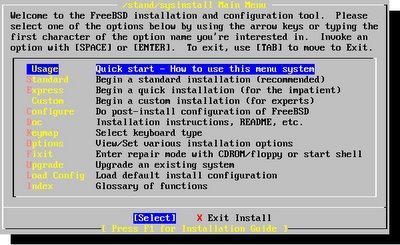 Fig: sysinstall Main Menu
Finally, It asked me a series of questions and made some changes to the configuration files according to my preferences. The questions asked were as follows:
- Would you like to configure any ethernet or SLIP/PPP network devices ?
- Do you want this machine to function as a network gateway?
- Do you want to configure inetd and the network services that it provides ?
- Would you like to enable the SSH login ?
- Do you want to have anonymous FTP access to this machine ?
- Do you want to configure this machine as a NFS server ?
- Do you want to configure this machine as a NFS client ?
- Would you like to customize your system console setting ?
- Would you like to set this machine's time zone now ?
- Would you like to enable Linux binary compatibility ?
- Does this system have a PS/2, serial or Bus mouse ?
For all the above questions all I had to do was give a Yes or No answer. And accordingly suitable action was taken by the FreeBSD installer.
- In the next step, I was given the choice of fine tuning which packages I want installed on my machine. Here I chose the default selection.
- Lastly I was prompted to create an ordinary user account and also set the password for the root account.
That is it. Now I was free to reboot into the newly installed FreeBSD.
Characteristics of FreeBSD
1) A robust OS with its own set of command line tools similar to (but not same as) those found in Linux. This I realized when I executed the command :
# fdisk -l
In FreeBSD, it gave me a short help on the options to be used with fdisk command. Where as in Linux, it lists the partition table. In fact all the command line tools in FreeBSD have been inherited from the BSD port and only their names are similar to their counterparts in Linux.
2) FreeBSD boots into C Shell by default. Though you can also switch to the bash shell.
3) Has a wide collection of applications (Over 8000 packages) in its ports system which is equivalent to the Yum/Apt-Get in Linux and installation of new applications is a snap with automatic resolution of dependencies.
4) Installs a very secure OS by default.
5) The file system used is the Unix File System (UFS2) which supports additional features not supported in Ext2(3) filesystems.
6) Will run applications compiled on Linux platform if the Linux compatibility package is installed.
Initial drawbacks for FreeBSD converts
1) Even though I found the FreeBSD installer rather intuitive, a first time user might find it a bit unfriendly when compared to the installers of RedHat or SuSe.
2) Users migrating from Linux will encounter a slight learning curve as they will have to learn some new commands and unlearn a few others. Also the file hierarchy is different than in Linux.
3) If your system has ISA cards, then there is a fair chance that you might encounter some trouble in installing FreeBSD 6.0 basically because you do not have the option of configuring the kernel during install time when you can enable ISA support - which I think is disabled by default. I was able to install FreeBSD 6.0 on one of my PCs which had an Aztec2320 chipset based ISA sound card. But each time I booted into FreeBSD, the system hung for close to 30 minutes during booting, after which it booted up normally. I didn't encounter this problem when I installed on a newer Pentium 4.0 machine which didn't have any ISA slots.


